|
STRENGTH TEST - HAND GRIP LEFT *SCREEN SHOT *
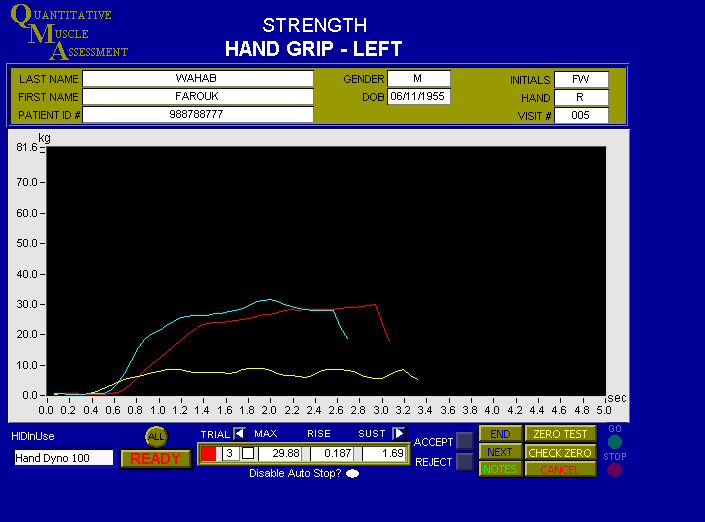
Comments --> Testing Screen -
Test Start, End, and Move to next Test can be controlled with a remote switch
(to assist in stabilizing the patient) or from the keyboard
Each trace of effort is easily distinguished by color.
No limit to the number of traces taken of a test during a visit.
Y axis may be modified to accentuate or accommodate patient's efforts during
testing.
Duration of test may be set globally as your desire..
To increase the detail of testing results, the number of data points per second
may be modified.
Information and Rejection Screen
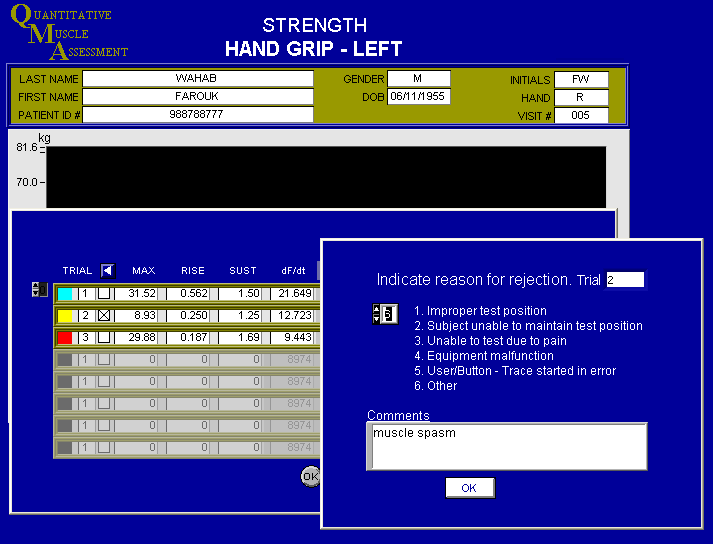
Effort of patient may be rejected due to legitimate reasons - spasm, equipment
failure, etc.
Annotation may be made for the rejection. Annotation may be made for
any reason in NOTES. AUTO STOP - When maximum is reached and a predetermined
amount below maximum is reached (Exp. 30%) , auto stop will discontinue the
test. Auto stop may be disabled to view the back of the
effort's slope, or as desired.. ZERO TEST - A tare may be set, and the system
reset to zero so measurement of only the effort may be taken.
CHECK ZERO - After the tare is set, and Zero Test is selected - you may check
for zero here. Subject/Patient instructed to
expend maximum effort during a five second test.
Two efforts (traces) were expected.
A third was required due to an unexpected muscle spasm, experienced in the
second effort.
Notice:
Max, Rise, Sustained, and Coefficient of Effort - shown and explained below -
By Selecting ALL (above the ready button) - the acquired data
of this test may be viewed.
The data of an unacceptable trace may discarded, with
annotation.

Max - maximum measured in this effort (trace).
Rise - Time from zero to maximum
Sust - Sustained time measured as a + variable percent (75%) of maximum.
df/dt - Coefficient of Effort - a measurement of peak rate of force development.
Continue to Next
*SCREEN SHOT *
Back to Top
Return to Home
|