QMA SYSTEM   SEARCH   WHAT'S NEW    FAQ-INFO    QMA-DEMO    ABOUT QMA


             PRODUCT
      INFORMATION

     Computers
    Exam Table
 Orthopedic Frame   
     ================

     Testing Photos
      - - - - - - - - - - -
       Screen Shots
         - - - -  - - - - - -
       CE Mark

     
- - -- - -  - - - - - 
   
Tariff / Customs
     
 - - - - - - - - - - - - 
       clients_clr.gif (5175 bytes)
 
      QMA USER-    
   
Access Request

     
 - - - - - - - - - - -
      
Privacy Policy
       - - - - - - - - - - - -
 
      AWARDS


  PATIENT PROGRESS REPORT -

  Longitudinal Comparative /
  Normal Expected /
  Percentage Change - Select a STATIC example to view -

  US / American Format - Illustrated example file with narrative

  European Format - Illustrated example file with narrative
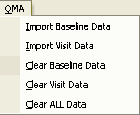
The commands to select to complete the form are:
1. Get Baseline Information - Fills header and baseline (any visit)  information
2. Get Visit Information - Select any visit for second visit information
3. Clear Baseline Information - Clears baseline and header Information
4. Clear Visit Information - Clears second visit information
5. Clear All Information - as Stated


 *** NOTICE *** - An interactive demonstration form may be downloaded - Select here.


 Back to Top
 Return to Home